
Hundreds of great Windows Tips
and Tricks for Windows 95, NT, XP and Vista are easily accessed here. To cancel the filter and view all the tips, click the
"Show All" button on the bottom button
bar. The Symptom is displayed below the category, and
the tip for that symptom below that.
Search: To search the database,
click the "Search" button. The
Search panel will appear: Enter keywords that resemble your symptom, click
"Search" and tips for that symptom will appear. Use the Prev and Next
buttons below to navigate. To cancel the filter and view
all the tips, click the "Show All" button on the
bottom button bar. You can also copy the symptom and cure to the
clipboard by clicking "Tip To Clipboard". Print: Clicking the 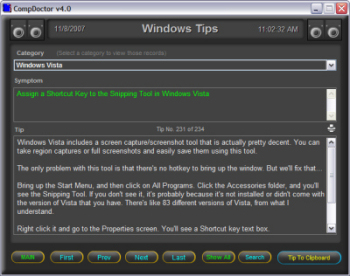
Category: Shows the category the current tip
applies to. To show all tips in one particular category, drop down the
category box and make a selection. Only the tips for that category will
then be displayed. Use the Prev and Next buttons below to navigate.

 button located between the
symptom and tip lets you print a hard copy of the current
record.
button located between the
symptom and tip lets you print a hard copy of the current
record.
Copyright © 2001-2007 HighDesert Software Co.